Key Takeaways:
- Self-service should help travelers move through common tasks with less stress and fewer delays.
- Clear signs, accessible interfaces, multilingual guidance, and visible staff should function as a single service system.
- Designing for accessibility improves the experience for older adults, families, tourists, first-time visitors, and people with disabilities.
- Travel hubs should track completion, errors, wait times, assistance requests, and traveler feedback.
- Technology is most useful when it handles routine work and leaves people available for exceptions and complex needs.
Why Travel Hubs Need A Better Service Model
Airports, train stations, bus terminals, ferry ports, and visitor centers can be challenging places to navigate. Travelers may be carrying luggage, watching a departure clock, managing children, using an unfamiliar payment method, or trying to understand a new language. In that setting, even a small obstacle, such as an unclear sign or a confusing fare choice, can create a larger delay.
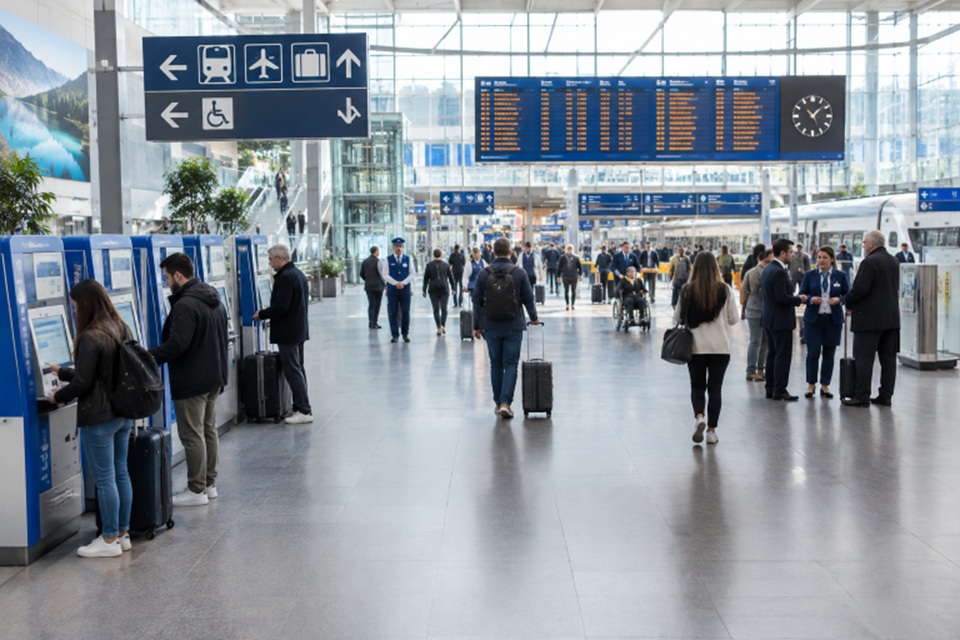
Better service does not simply mean installing more screens. It means making routine tasks easier to complete while preserving support for people who need it. Well-positioned travel touchpoint kiosks can help travelers purchase tickets, check schedules, print confirmations, and find directions, but only when the surrounding experience is equally clear.
Access begins before a passenger reaches the terminal. A recent federal review found that travel time, accessibility, and unfamiliarity can deter transit riders from using public transportation to reach airports. The same principle applies inside a hub: people are more likely to use a service when they can understand it quickly and trust that help is available.
What Modern Travelers Need
Not every traveler arrives with the same confidence, mobility, language skills, or access to digital tools. A daily commuter may want the fastest possible transaction. A tourist may need a simple explanation of fare zones, platform locations, and local connections. Families and older adults may need more time, seating, or personal assistance.
- Fast access to tickets, passes, boarding details, and directions.
- Plain language and visual choices that are easy to scan.
- Clear information about accepted payment methods and fees.
- Multilingual instructions for essential tasks.
- Accessible controls, screens, audio, and physical clearance.
- A simple path to staff support when the standard process does not fit.
Build Around The Full Passenger Journey
A travel experience is a chain of decisions, not a single transaction. Someone may need to find the correct entrance, identify a ticket machine, choose a fare, pay, locate a platform, check for delays, and change plans after a disruption. Designing each tool in isolation often leaves gaps between those steps.
Suggested Journey-Mapping Steps
- List every action required from arrival through boarding or exit.
- Observe where people stop, turn around, ask questions, or abandon a task.
- Separate routine transactions from issues that require staff judgment.
- Test the process with local riders, visitors, older adults, and people with disabilities.
- Remove unnecessary steps that do not help travelers reach the next decision point.
Make Self-Service Easy To Use
A good self-service interface should make its main purpose obvious within seconds. The most common task should appear first, instructions should use familiar words, and travelers should be able to correct errors without restarting. Prices, fees, and refund conditions should be visible before payment, while a final confirmation should explain exactly what happens next.
Consider a visitor buying a regional rail pass while holding luggage and checking a departure board. That traveler should not need to decode agency terminology or remember a long sequence of choices. A short, readable flow, visible progress, a back button, and enough time to review each screen reduce the mental effort required during a busy moment.
Design For Accessibility From The Start
Accessibility works best when it is included in the first design review, rather than added after equipment and layouts are already chosen. A complete approach considers visual, hearing, mobility, cognitive, language, and temporary access needs. It can include high-contrast text, audio prompts, tactile controls, captioned instructions, reachable payment devices, wheelchair clearance, and simple sentence structure.
Consistent letters, numbers, colors, and shapes can also make navigation easier for people with limited English proficiency, visual impairments, or cognitive disabilities. Before launch, operators should ask whether a traveler can complete the task while seated, recover from an error independently, and receive the same essential information through more than one format.
Use Wayfinding To Reduce Stress
Wayfinding begins before a traveler reaches a kiosk or counter. Signs, floor markings, maps, digital displays, and staff directions should use the same names for gates, platforms, exits, and services. Information should appear at decision points, where people must choose a route, rather than after they have passed the correct turn.
- Mark entrances, exits, platforms, gates, elevators, and restrooms clearly.
- Show transfer instructions before passengers commit to a direction.
- Identify accessible routes without making travelers search for a separate map.
- Use temporary signs that match permanent terminology during construction or service changes.
Keep Human Help Close By
Self-service does not mean service-free. Staff remains essential for disrupted itineraries, failed payments, mobility needs, travel-document questions, and situations that do not fit a standard menu. A strong blended model lets technology handle predictable tasks while employees monitor high-confusion areas and provide calm, timely assistance.
Staff should be visible, easy to approach, and trained in accessible, respectful communication. Their feedback is also valuable. Repeated questions about the same fare, button, or route usually point to a design issue that can be corrected before it becomes a larger service problem.
Connect Digital Tools & Physical Spaces
Travelers should not receive conflicting answers from an app, website, kiosk, display, or service desk. Platform names, departure times, fare rules, service alerts, and receipt details should align across channels. A mobile trip plan should guide a person toward the correct on-site location, while real-time updates should reach both public screens and frontline employees.
Measure Results That Matter
Transaction volume alone does not show whether a service works well. A busy kiosk may still lead to repeat attempts, abandoned purchases, or increased workload for staff. Useful measures include average wait time, task completion time, payment errors, equipment uptime, assistance requests, accessibility complaints, and post-task satisfaction.
Review results by location, time of day, traveler type, and task. That comparison can help identify whether the problem is the interface, physical layout, unclear instructions, equipment reliability, or insufficient staff coverage.
Common Questions About Travel Hub Self-Service
Does self-service remove the need for employees?
No. It can reduce repetitive work, but employees are still needed for safety, accessibility, exceptions, and complex questions.
What makes a travel kiosk easy to use?
Clear language, short task flows, accessible controls, visible pricing, multilingual options, and straightforward error recovery are all important.
What is the best first step for an older facility?
Start with observation and journey mapping. Learn where travelers struggle before investing in new hardware or a full redesign.
Conclusion
The strongest travel hubs combine speed with patience, automation with human support, and digital tools with clear physical guidance. A better passenger experience is not created by a single screen or app. It comes from a connected system that helps people move forward confidently, regardless of age, ability, language, or travel experience.